The editor has a tree view on the left side where you can see the significant items in your Memoir.
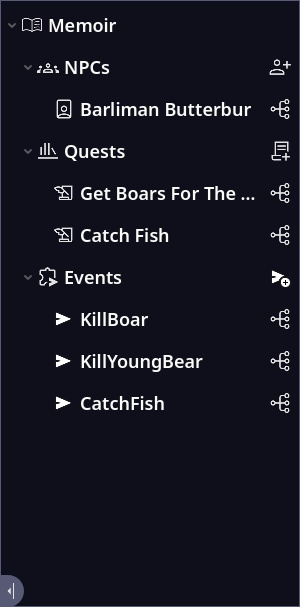
At each branch is an add button on the right side to add new items for the branch.
On the right side of each item is a node icon you can click on to show that item in the Dialogue view.
On the bottom left of the Tree is an icon you can click to collapse the Tree View leaving more space for the edit views.
Opening Edit Windows
Double clicking on ant item in the list will open that Items edit window. So if you double click on an NPX it will open the NPC edit window.
Icon Descriptions
| Icon | Description |
|---|---|
 |
The is the main Memoir Node at the root of the tree. |
 |
The branch where all the NPC’s are managed. |
 |
Pressing this add a new NPC to the NPC’s branch. |
 |
This row in the Tree is an NPC. |
 |
The branch where all the Quests are managed. |
 |
Pressing this add a new Quest to the Quests branch. |
 |
This row in the Tree is a Quest. |
 |
The branch where all the Events are managed. |
 |
Pressing this add a new Event to the Events branch. |
 |
This row in the Tree is an Event. |
 |
Pressing this will move and focus the Dialogue view to that tree item in the Graph view. |
 |
Pressing this will hide the tree view leaving more room for the editor view. |
 |
Pressing this will show the tree view again. |