Quests help guide the player through the adventure. They create journal entries and specific objectives for players.
You can find a Quest NPC on the Dialogue view quickly by clicking the graph icon show above in the Tree view. This will open the Dialogue view and focus on that Quest.

| Field | Description |
|---|---|
| Name | The quest name the player will see in the Quest list as well as the title for that quest. |
| Description | This is description for the quest. |
| Summary | This is summary for the quest this will be added to the journal when the quest is triggered. |
Quests in the Dialogue view.
Quest triggers and Objectives can only be created in the Dialogue view.
Events for Quests
The trigger events of Quests can only be edited in the Dialogue view as you can see from the image below.
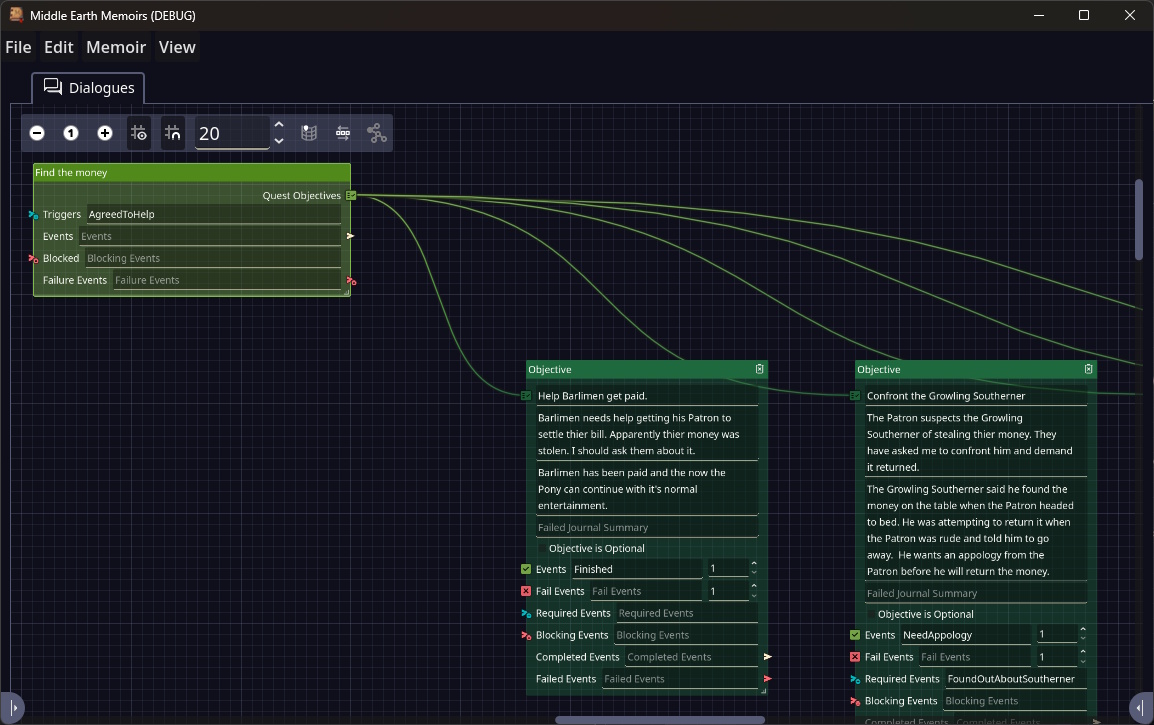
| Field | Description |
|---|---|
| Triggers | Any of these events will trigger this quest. |
| Events | These events will fire if the Quest completes. |
| Blocked | If any of these events fire before the quest is activated the quest will be blocked. |
| Failure Events | Failure events will cause a quest to fail. This will only have this effect if the quest is active. |