Once you have opened the Editor you will be able to edit it’s details by double clicking the Memoir in the Tree view. That will open the Memoir edit screen as seen below.
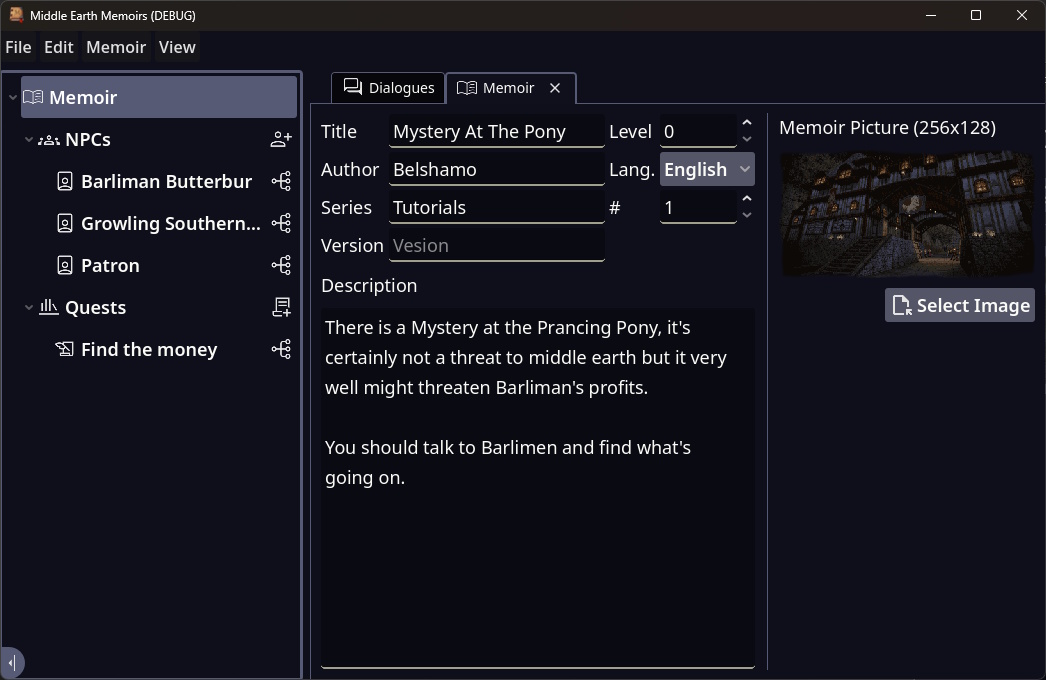
| Field | Description |
|---|---|
| Title | This it the Title for your Memoir. They should be unique. |
| Level | This is the appropriate level the player should be to do this Memoir. |
| Author | You |
| Lang. | Currently only English has been implemented. |
| Series | This is the Series name for this Memoir. This can be a useful way to break a few stories into bite sized parts. |
| # | This is the number in the series this Memoir represents. |
| Version | This is the version of the Memoir it will eventually show in the Plugin’s version. You can not export without a Version. |
| Description | This is the description for your adventure. It should include a basic introduction and an initial action the play should take. |
| Picture | The image for your story. This will show in the book and does work best if you burn the edged off. The image needs to be 256x128. |