Dialogues are edited on the Dialogues graph window. This window is always available in the edit screen.
You can find an NPC on the Dialogue view quickly by clicking the graph icon show above in the Tree view. This will open the Dialogue view and focus on that NPC.
Creating Dialogue
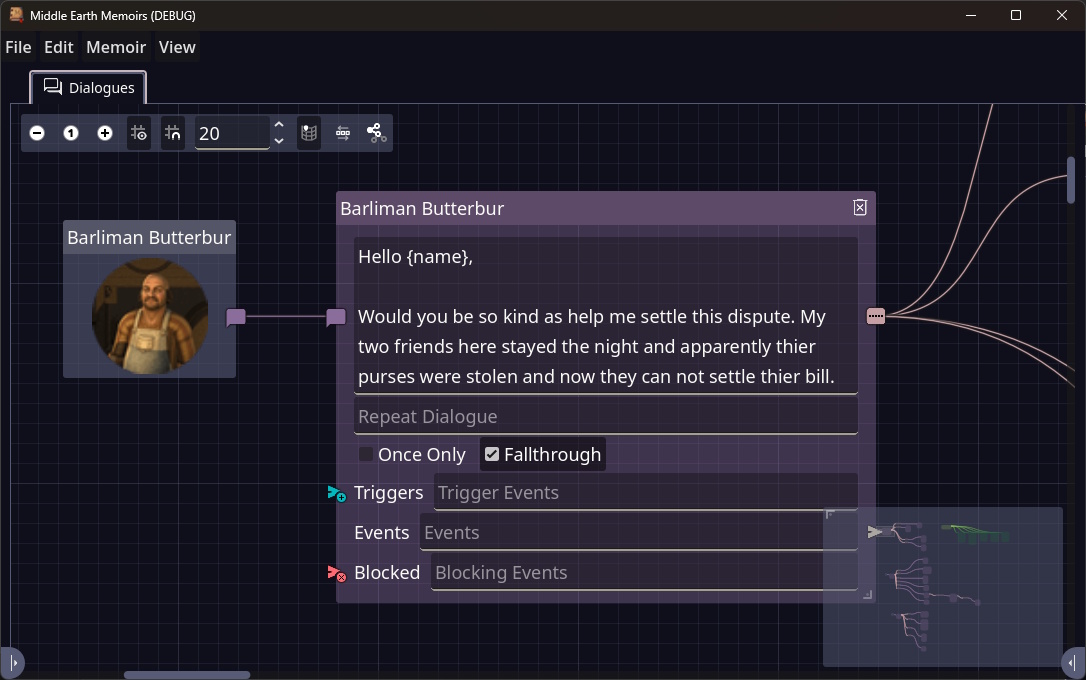
To create the first Dialogue left click and drag from the right side purple chat icon into the grid. When you release the first Dialogue will be created.
| Field | Description |
|---|---|
| Dialogue | This is the text that will be shown for this Dialogue. If there is no repeat then this will show every time. |
| Repeat Dialogue | This is an optional text to show on repeated visits. It allows for easy way to create the idea the NPC’s remembers the player. |
| Once Only | If this is checked this dialogue will try to show only once. This means it it’s been seen before it won’t be available again. |
| Fallthrough | If this is checked this Dialogue will jump to deeper parts of the conversation if only one option is available for the player to choose. This is how you creating branching by having only one branch available due to state and then falling through. |
| Triggers | If there are triggers in the list then this dialogue wont be available until at least on of them has fired. This is how you can create Dialogues that only show when the player has done something. If empty this dialogue will be available immediately. |
| Events | This is a comma separated list of the events seeing this dialogue will trigger. This can be used to open new dialogues with other characters or even trigger quests or quest objectives. |
| Blocking Events | This is a list of events that will disable this from being available. The off switch for this dialogue. |
Embedded Text
Currently text can support embedded values although there is only one for the time being that is {name} is will be replaced with the players name. This may be expanded over time.